http://invisible-island.net/vile/
Copyright © 1999-2020,2022 by Thomas E. Dickey
vile – Vi Like Emacs – is a text editor.
vile retains the "finger-feel", if you will, of vi, while adding the multiple buffer and multiple window features of emacs and other editors. It is definitely not a vi clone, in that some substantial stuff is missing, and the screen doesn't look quite the same. The things that you tend to type over and over probably work. Things done less frequently, like configuring a startup file, are somewhat (or very, depending on how ambitious you are) different. But what matters most is that one's "muscle memory" does the right thing to the text in front of you, and that is what vile tries to do for vi users.
A lot of people, of course, as is true of almost all large programs. (No counter examples come to mind for programs larger than vile).
Vile was started by Paul Fox from an early (public domain) version of MicroEmacs. That is a little odd for two reasons:
MicroEmacs is not like the other flavors of Emacs which you may be familiar with, since its extension language is not Lisp. It looks something like Lisp without the parentheses. (Lisp is humorously reported to stand for Lots of Irritating Silly Parentheses).
Vi is supposed to be a "modal" editor, and Emacs not. This is a big issue in the newsgroups, almost as critical as the placement of curly braces in C.
So Paul did a lot of work making vile.
I started working on vile late in 1992. Though I had been using vi for almost ten years, it was with little documentation (I long ago lost a grubby photocopy of vi's commands), and had only recently gotten involved in projects where I would edit large numbers of files. Two buffers weren't enough, and (because I was collecting tools for development) I noticed some discussion of implementations of vi that could handle multiple windows. Xvi was unable to get the correct screen-size. Vile looked better, but there were a few problems with left/right scrolling (individual lines would shift, but the display did not necessarily shift as a whole). So I started fixing vile.
Kevin Buettner came in early in 1994, changing the X Windows driver, and later implementing the Perl interface. Rick Sladkey arrived in 1995, working on win32 and djgpp.
We four are listed as authors of vile – but many more people have contributed code, fixes and feedback.
Vile is not huge—at this time (late 2011) the sources total about 174,000 lines—but is still large compared to some editors. A good deal of the bulk is from I/O drivers for different systems. Most of those drivers were written or modified heavily by other contributors.
With so many editors to choose from, differences may appear slight. Start with the documented features.
As seen in vile's help-file, it assumes that you are already familiar with vi:
The only vile commands described herein are those not present in vi, or differing greatly from those in vi.
There is a section at the bottom describing other differences between vile and vi.
In contrast, the other common “vi-clones” (elvis, nvi and vim), include the vi documentation—modified to include their extensions. In some cases, the distinction between vi and the clone is obscure.
Vile's documentation can be considered in three parts:
The last part is a difference.
We build vile using a combination of hand-crafted code and tables generated by a special-purpose program mktbls. The source files for those generated tables comprise about 13% of the source code which is used to build vile. Paul Fox wrote mktbls in 1990. When I started work on vile, it was not used routinely to build the tables. Adding a new feature would require modifying the code in two or more places, e.g., one or more function prototypes plus one or more table entries. I revised the program, and made it the first step in building vile. As of 2014, mktbls reads 2,745 lines of data to produce 20,604 lines of header-files.
Vile uses the tables in various ways, including showing the available commands, providing name-completion, lists of predefined variables, functions used for scripting, etc. In other flavors of “vi”, tables like this are an integral part of the hand-crafted code—requiring their developers to do much of the busy-work which mktbls does.
Moreover, in other “vi” flavors, the information shown in response to status commands is static, requiring interaction from the user to make the editor update the display. In vile, however, this information is dynamic—it updates these special buffers (and their windows) as changes are made to the features they render, e.g., the list of all buffers in memory, the mode-settings corresponding to the buffer which has focus, etc.
While many (not all) of vile's features are now found in other vi-compatible editors, some of the most powerful were implemented before widespread adoption in the others.
For example, multiple windows were early features in vile (and xvi) from the start. The same applies to reading from pipes, complex fences. Some of this is brought out in the O'Reilly book, though no careful study has been made of the way in which features are adopted and adapted across the “vi” and “emacs” variants.
Paul Fox's comment at the beginning of this FAQ suggests that
vile is not a vi-clone.
Others say it is. The answer depends on what you want the editor
to do.
While other programs may be suggested (see for example, Sven Guckes' page), the term arose in comp.editors during the mid-1990s to refer to four specific programs which reimplemented vi. Those are (in canonical order): elvis, nvi, vim and vile.
The other programs are interesting only to a few. Guckes commented on Calvin, but had little to say about xvi, which I have noted. For instance, I compared xvi to vile in 1992, and was interested in Ned Konz's work on OS/2 in 1994-1995 to use O/2 Presentation Manager as alluded to in his last announcement in September 1995:
From: nedkonz@gate.net (Ned Konz)
Subject: ANNOUNCE: Alpha version of OS/2 PM XVI port available
Date: 1995/09/03
Message-ID: <42ar7e$2gu6@news.gate.net>#1/1
X-Deja-AN: 109364009
distribution: inet
newsgroups: comp.editors,alt.org.team-os2,comp.os.os2.programmer.tools,cybergate.os2

I've ported a public-domain VI clone (XVI) to the OS/2 Presentation
Manager. I've added a lot of things, including a menu, mouse re-sizing
and text motion, clipboard interface, etc.

It is currently in alpha release for testing only (please don't
distribute it any further; I will when it's done), and I need some
testing.

You can get it at ftp://gate.net/pub/users/nedkonz/xvipma4.zip

Please email me with bugs/suggestions.
Thanks,
Ned Konz
nedkonz@gate.net
Like vile, xvi had a workable port to use OS/2 VIO (console windows), but a GUI would have been nice. I tested the third alpha (announced in mid-August), and sent a list of items to resolve. However he did not address the issues I raised, and none of his changes were merged into the original xvi. As I understand it, the source was lost long ago (a binary can be found here).
By 1996, the term "vi-clones" had come to mean simply the four which I mentioned, with little influence from the earlier variants. Later programs (such as winvi, first announced in 1998) did not change that.
Besides basing their design upon vi (with extensions), the vi-clones also influenced each other, mainly through the comp.editors newsgroup in the early/mid-1990s.
Elvis was the pioneering vi clone, widely admired in the 1990s for its conciseness and many features. For that combination it is still unmatched among the vi clones. It was the first to provide color syntax highlighting (and to generalize syntax highlighting to multiple filetypes), first to provide highlighted selections via keyboard. Elvis's built-in nroff (early) and (later) html displays gave it unusual WYSIWYG features.
To my eyes, elvis had the conciseness of a program which solved a 15-tile puzzle which I saw demonstrated on a co-worker's MacIntosh in the mid-1980s. Very nice, and impressive.
Steve Kirkendall (elvis's author) would occasionally post to comp.editors, discussing plans and release notes. I started the VMS port of vile using Steve's earlier port of elvis as a reference for the system calls.
The initial release of elvis (1.4) from 1990 (or possibly 1991)is the basis for the Debian "elvis-tiny package. Elvis 1.6 was released August 1992, (though neither GNU nor GPL) was available on the GNU tape according to the INDEX file here, dated December 18, 1992. Likewise, elvis 1.7 (seen also here, in 1993).
Nvi was developed by Keith Bostic, and extended by Sven Verdoolaege (a contributor to ncurses). Keith Bostic did not post to comp.editors, nor did Sven Verdoolaege.
Keith Bostic, who is the author of the POSXI vi description, declined to document the modeline feature since it is insecure.
Once (early in 1997) I was discussing ncurses problems with Keith on the telephone, and happened to digress, telling him that I admired nvi for its compatibility with the original vi. Keith responded with a comment that "vile always did windowing better than anyone else".
Aside from using it as a reference version of vi, for testing compatibility, vile does not directly use nvi.
As Kevin Buettner remarked some time ago, vim is a fine program, but there is a problem with the hype used to promote it. Bram Moolenaar is fairly easy to get along with; this is not true of his fans (see this for example).
Though presented as the work of a single developer, it was apparent to others that there were many people working on vim during the mid-1990s.
Some of the vim developers (rarely Bram Moolenaar) posted to comp.editors. The only time that I recall Bram posting to comp.editors was to dispute a point with me regarding the compatibility (versus vi) of vim's implementation of the tags setting (a list of filenames).
Most of the discussion on comp.editors regarding vim was by vim's contributors or fans. Not much of that was productive, since its fans were largely ignorant of the features in original vi, and routinely credited vim for those features.
There are a few features where vile and vim have influenced each other. Beginning with 3.0 (August 1994), vim's developers began making lists of features that other programs did, which vim should, with a note where the feature was copied from. As those were implemented, the note was removed; the changelog reflected only the addition.
For completeness, here are the items from vim's to-do lists referring to vile:
CTRL-X e: edit file name under the cursor (like ^] and *)
Show unprintable characters in hex.
Use scrollbar.
When horizontal scrolling, use '<' and '>' for lines continuing outside of window.
Allow file name "-" as command line argument: Read file from stdin. Open
/dev/tty for commands (use "more" "vi" or "vile" as an example how to
do this).
Show unprintable characters in hex. (or in octal)
When horizontal scrolling, use '<' and '>' for lines continuing outside of
window.
Support putting .swp files in /tmp: Command in rc.local to move .swp files
from /tmp to some directory before deleting files.
The last two items mentioned in 4.0 still appear in
vim's to-do list as of release 7 (May 2006).
The other two appeared in releases 5 (February 1998) and 6
(September 2001).
I found these items noteworthy:
the feature which lets one pipe a file to the editor — in turn after I had implemented it in vile, someone commented that John Davis' editor did that too. Its inclusion in vim had the predictable response from its fans.
I had added the swap-file feature in vile (like original vi or elvis) not for recovery, but to allow editing larger files in 16-bit DOS without a memory extender. Ironically, I was never satisfied with the performance and removed it later.
Likewise, vile has borrowed occasionally from vim. For example, the way vile shows the "no" prefix for a disabled boolean mode in the settings display was prompted by seeing it in vim. However, vile's settings display is dynamic (updated when a mode is changed), while vim (like vi) is static (requires the user to re-enter the command to get a new display).
Occasionally someone asks for a feature like vim's (or unlike it). Those are noted in the change-log for vile, e.g., nine occurrences since 1999:
+ add linebreak mode, like vim (request by Paul Van Tilburg).
+ add (nvi/vim) ex-commands: a!, c!, i!
+ add ":c" as alias for ":change-til" (nvi/vim).
behavior, unlike vim (request by Igor Schein).
treated as comments if there was a /x modifier. vim does not check
with vim. Remove reference to nonexistent -m switch (which was
winvile. Patch is based on code I recently noticed in the vim
+ add vimmode, for vim syntax files
the former, nvi does the latter, and vim repeats the entire string.
Vim's credits section mentions elvis, nvi and a few other programs (without explaining why—although reasons are given for vim's developers). It omits vile. The stevie program gets three lines (one for each developer of stevie), while elvis gets one.
In retrospect, elvis was the major competitor to vim in the mid-1990s:
Steve Kirkendall announced each release with a detailed summary of the new features, how they were used, etc. In contrast, each incremental announcement for vim would list all features, making it appear that those features were newly released.
Elvis introduced syntax highlighting a few years before vim's developers provided a more elaborate implementation.
Elvis's WYSIWYG features, by the way, have no counterpart in vim.
That is us.
Each program's developers made their work available for use by others after completing a "good enough" version. I can see the beginning dates for vile and nvi by referring to my RCS archives for the former, and a Git repository for the latter. For the rest, I rely on snapshots of the programs which I have collected, email (and newsgroup postings), as well as websearches to gain insight.
Steve Kirkendall also used RCS, and reported several release dates in an email discussion in August 2003. Steve commented in the Vi6 book that he was using Minix (which was first released in 1987), and lost time due to a crash of the stevie editor. In a message to the Minix newsgroup, Steve commented in April 1990 that he had released Elvis 1.1 in January (see this to compare). From the quoted mail-headers, it appears that Steve continued work on Elvis shortly after an announcement (probably 1.3) on April 20, 1990, and completed a "good enough" version by November 15, 1990. The earliest version of Elvis mentioned in the discussion was version 1.4, released December 3, 1990. I have a copy of that, with the files dated December 5—close enough. Unlike Bram Moolenaar, Steve Kirkendall did not say in the Vi6 book that he used stevie as a starting point; the sources are not similar. Elvis 1.4's comments do note some code attributed to others, i.e., for ports to MS-DOS, Atari/TOS, Microware OS9/68k and Coherent.
The first check-in for vile was September 21, 1990, about a month after Paul Fox stated his intentions on alt.sources.
Keith Bostic checked-in some files from Elvis on 1991-04-17, i.e., the Initial revision. In the Vi6 book, Keith says that was Elvis 1.8; however due to the date it must have been actually 1.4 (initially).
Bram Moolenaar did not use any source control system until others (including Sven Guckes) intervened, in mid-December 1999 (see CVS, e.g., the first commit says “imported vim-5.5”). In discussing this with Sven Guckes around that time, I noted that the vim-4.6 tarball was corrupt (he commented that was one of the problems which led to putting vim into CVS). While writing this, I happened to check (after seeing the bogus timestamps in the vim 2.4 tarball) and downloaded the current one, marked as "13-Mar-1997". This one is the same size—and untar's. But a few files in that are dated "08-Jun-2000".
The vim CVS does not contain any earlier version than the initial check-in date (it has vim 5.5, released September 19, 1999). For anything older, one has to look at the existing tarballs. Since I began this FAQ, the CVS was abandoned, to use Git; that begins with vim 7, making it useless for this part of the FAQ.
The date at which Bram started development is not mentioned in the Vi books. According to Ryan Paul's 2011 article, Bram started development on an Amiga in 1988. Paul's article did not identify the source of information used; based on its content (aside from mentioning his personal experience) it came from here. In turn, that came from Moolenaar's presentation in 2000 (twelve years later).
I have found no contemporary mailing-list or other records to fill in details; the comments found were written long afterwards. According to the Vi6 book, Bram began development of vim by modifying stevie (which was released in mid-1987 or 1988), but did not actually state when this happened. For something tangible, I refer to the initial 1.14 release (for which we have only the tarball along with second-hand information or follow-up postings several months later as seen here):
The credits in the source code make it apparent this was
based on Tony Andrew's improved version of
stevie, from mid-1988. The
version.c file has this comment:
 * Version      Changes (and person who did them)
 * -------      ---------------------------------
 * 3.10         - version that started it all. Found on comp.sources.unix
 *                        Jun88 Volume 15 i037, i038, i039, i040, i042, and INF3
 *                      - Tim Thompson and Tony Andrews
Further comments in version.c mention
distribution on Fish disks.
 * 3.6          - Big jump in revision number to do last version on a Fish Disk
 *                        being descibed as version 3.5 (thus people will know this is
 *                        a later version).
 *                      - Miscellaneous little changes.
 *                      - GRWalter (Fred)
 *
 * VIM 1.0      - Changed so many things that I felt that a new name was required
According to the Fish disk summary, vim appeared on disk 591, and was based on stevie from disk 256. That disk has vim 1.14 (binaries dated January 31, 1992). The last version of stevie listed on the Fish disk summary was for disk 256. In between, there is a gap of more than three years to account for.
There are no dates in the sources by vim's developers (three borrowed files have dates).
The earliest file-timestamp (one file, a shell script) is February 5, 1990.
Eight files have timestamps for June 15, 1990.
The remaining files are dated in 1991.
At least one file (cmdtab.tab) contains code
adapted from elvis 1.4, i.e., symbol names and
comments.
Elvis 1.5 was mentioned in a comment in version.c; later (in vim 2.4), Steve Kirkendall was credited for Elvis.
The timestamps in the vim 2.4 tarball (released, according to a comment in the code, on July 13, 1994) are almost all December 31, 1979...
Subsequent versions did not give date-information, other than in the version-string, until vim 2.0 (December 1993), when occasionally a date might be found in a readme file, etc. Incidentally, that was when the description changed from “Vi IMitation” to “Vi IMproved” (a different story as yet untold).
Paul's article contains some misinformation regarding these dates, asserting that Moolenaar's change to its description took place a year earlier (e.g., sometime in 1992), but the cited version (1.22) was apparently never released: there was no announcement on comp.editors, and there are no existing source-tarballs.
Paul's reference for this was the same source as the bulk of his article. In turn, (given the version numbers quoted), that was based on Moolenaar's article about vim 6.0 (released September 28, 2001), which lists a few early releases. In that article, he did not mention version 2.0 (nor did the article actually say when he changed the description):
-------------------------------------------------------------------------
  1991 Nov 2  - Vim 1.14: First release (on Fred Fish disk #591).
  1992        - Vim 1.22: Port to Unix.  Vim now competes with Vi.
  1994 Aug 12 - Vim 3.0:  Support for multiple buffers and windows.
  1996 May 29 - Vim 4.0:  Graphical User Interface (largely by Robert Webb).
  1998 Feb 19 - Vim 5.0:  Syntax coloring/highlighting.
  2001 Sep 26 - Vim 6.0:  folding, plugins, vertical split
-------------------------------------------------------------------------
The omission is odd, but in any case, the source-tarballs are readily available to demonstrate when the change occurred. In the closest release to 1.22 (1.24), Moolenaar referred to it as “Vi IMitation” and continued to do so through 1.27 (the last release before 2.0).
Moolenaar's postings to comp.sources.misc make this detail clear, giving the description, the newly released version and referencing the older version:
None of those postings mentioned a date for initial development.
There is no source for the earlier (before November 1991) versions, so it is only possible to glean limited information as shown here.
Moolenaar's 2001 article does not give a date for when he began development. The earlier presentation mentions 1988, but is an outline only, giving few details (and is unsuitable as a source for this FAQ). A pertinent newsgroup posting from Moolenaar from 1991 through 1994 (i.e., vim 3.0) would be useful.
Paul's article used 1988 from here or here. It can be disregarded.
Given the available sources of concurrent information, 1988 is only gotten by seeing that it cannot be earlier than stevie.
In summary, the available documentation suggests that development of Elvis and Vim started around the same time, and that Vim borrowed first from Stevie, then from Elvis.
There is a lot of difference between developing a program (and using it yourself) and releasing it (and finding that your users notice the bugs). The dates for these are easier to find:
1990-11-15 elvis 1.4 (see above).
1991-06-07 vile version
three
Paul Fox spelled out some versions, and used digits for
others. This version was spelled out.
I may have read
this posting by Pete Ruczynski at the time.
1991-11-02 vim 1.14
According to the Vi6 book, this was
the first release, for Fred Fish disk
591.
1994-01-23 nvi 1.03.
Keith Bostic was developing for 4.4BSD, which itself was
released later, in June 1994.
This was the version
imported into NetBSD the following day (see
chart). A week or so later, a copy of this was put on
sunsite.
The ruler mode was one of the first features where the vi clones made themselves distinct from original vi.
Original vi had nothing like the ruler mode which you see in a vi-clone. If you do not have the feature, you can use the vertical bar to get to a particular column is a workaround (which in a quick check does account for tab-stops).
In original vi (such as AIX, HPUX, Solaris), pressing
control+G shows which line you are on, but
not the column, e.g.,
"shlib" [Read only] line 137 of 140 --97%--
The ruler mode was first introduced in elvis (see how to draw a line in vi at 80 columns):
    google shows me that elvis added this in version 1.5 (April 2, 1992), and
    for reference, version 1.4 was August 4, 1991.
It was added to vim in version 1.18 (undated) between
1.17 (April 20, 1992) and 1.24 (January 10, 1993):
 VIM 1.18 - Screen was not updated when all lines deleted. Readfile() now
            puts cursor on first new line. Catch strange disk label.
            Endless "undo line missing" loop removed. With empty file 'O' would
            cause this. Added window size reset in windexit(). Flush .vim file
            only when buffer has been changed. Added the nice things from
            Elvis 1.5: Added "equalprg" and "ruler" option. Added quoting.
nvi started as a fork of elvis, and inherited this code. Some people see nvi running and, supposing it to be original vi, are confused about the ruler mode (which is the most visible difference between nvi and original vi).
I added a ruler mode to vile in my changes for
version 3.57 (August 5,
1993), probably influenced by elvis.
So all four of the common vi-clones provide a ruler mode.
With color-highlighting, the program makes things visible using color, underlining, etc.
Brian Kral made a series of patches for elvis to
provide color for C and C++, e.g.,
Color Elvis 0.2e dated October 11, 1994.
Unlike Keith Bostic's use for nvi,
or the celvis
(Chinese) fork based on elvis
1.3, this was aimed at improving elvis.
Brian's patch compiled-in a parser which became part of the editor. We were reluctant to use that approach in vile because of size and performance. Kevin Buettner proposed a different route, using external programs which would generate markup that vile would overlay onto the editor's picture of the file. In his initial implementation (April 19, 1994), Kevin provided the manpage-filter. Jukka Keto provided the first filter to use color, which was added to vile on January 11, 1995.
Vim provided color-highlighting as part of syntax-highlighting, three years later, in release 5.0 (announced February 19, 1998 — the tarball for this release bundled ctags-2.0.2 which makes the result actually a week later than the announcement).
No version of nvi does color-highlighting.
Syntax-highlighting in an editor has acquired an additional connotation of rapid adaptation to the changes being made in the editing process.
Elvis introduced generic
syntax-highlighting in release 2.0 (October 1, 1996).
Elvis highlights different syntax using different
fonts and underlining. A user can map those fonts to
different colors.
Elvis uses a built-in keyword-oriented parser. It handles multiple computer languages using a configuration file which lists the keywords. The configuration file also contains declarations to tell Elvis which computer language to associate with a given file-suffix. Other declarations tell Elvis how to recognize and highlight comments.
Vim 5.0 (February 19, 1998), as noted provided syntax-highlighting integrated with color-highlighting.
Vim uses a different approach than Elvis. The configuration files for each file-type declare names for regular expressions. Vim matches these against the file's contents and associates the matches with colors. Keywords are a special case in this scheme.
While more general, Vim's approach is much slower. To compensate, Vim is normally configured to start its matching a few hundred lines before the part shown on the screen, rather than process the whole file. That works well enough in most cases; however it can produce bizarre effects for files containing multi-line matches (such as a Perl or shell script).
With vile, we continued along the path started in 1994. The handful of external parsers which we collected were not good enough. Those included (referring to the "utilities" directory on my ftp server): c, cweb, html, ispell, latex, make, nroff, rcs, perl, verilog (added from 1995 through 1997). A few people used them; I used the C filter occasionally. The configuration was not convenient to use. Obviously the way to improve things was to make them more closely integrated:
Elvis's syntax parser could not handle some of the things (such as Perl) which I had in mind; Vim's parser promised to be complex and slow.
While debating the alternatives, someone on the vile developer's list commented that the flex program could be told to rename its entrypoints. Doing that would allow us to combine several lex/flex-parsers in a program without naming conflicts. Alternatively, the same parsers could be built as standalone programs. I began reworking our parsers in mid-December 1998 to exploit this idea. The changes became my focus through mid-April 1999 when I released vile 8.3.
While flex is usually available, most of the syntax highlighters are usable in lex (which requires specifying table sizes). A few (such as Perl, Ruby and sed) are written in C, due to the limitations of specifying a pattern describing regular expression syntax in lex/flex format. The highlighter for lex is written in lex, however. The resulting executable code is by far the largest of any of the syntax filters.
In short, although we had syntax-highlighting in 1994, it continued to evolve.
No version of nvi does syntax-highlighting.
The Vi6 book refers to this as "visual (block) mode". I first enountered it using elvis while working on the MS-DOS port of vile in the early 1990s. Elvis uses "v" to initiate the visual mode; so does vim. Vile uses "q" because "v" was already bound:
"shrink-window"                 v
  ( decrease the size of the current window by CNT lines )
Elvis introduced this feature in version 1.5 (August 23, 1992). As noted in the Vi6 book, there are separate keys used to select rectangles, by line or simply by character.
Vim added visual mode in version 2.0 (December
14, 1993). The README2.0 file at the top of the
source tree says:
Renamed quoting to visual select and swapped 'q' and 'v' keys to avoid
problems with CTRL-Q. This is also more Elvis compatible. The commands now are:
        'v'             start character-wise visual select
        'V'             start line-wise visual select
        CTRL-V          start block-wise visual select

        'q'             start recording
        'Q'             formatting operator
I modified the quoted motion code in vile, to provide the three types of selection for visual mode in version 5.3f (early June 1995).
No version of nvi does visual-mode.
The POSIX description of vi uses the term “window” in many places. The original vi provided a single window on the edited buffer. That window could be resized (using a different number of lines on the non-resizable terminal).
That is not what most people would consider a window.
When I started working on vile in late 1992, I
wanted an editor which could handle multiple files,
which vi loads into memory as buffers.
While vi has :next and
:rewind commands to successively edit a list of
files, it only has two buffers (two files) available at
a time.
Vile supported multiple windows and multiple buffers from the start. Paul Fox's posting to alt.sources (June 7, 1991) was version three, with 17 window-management commands and 14 buffer-management commands. Most of those were bound to key-sequences, making them usable in vi-mode as well as ex-mode.
According to nvi's source-history, Keith Bostic began
working on horizontal split “screens” in April 1993;
revising this as the :split command in August 1993.
The result was included in nvi 1.00 (January 1994).
Later in October 1996, Bostic added :vsplit (for
vertically-split windows). “:vsplit”,
just after releasing nvi 1.79.
Bostic used different terminology (i.e., “screens”) to distinguish this from the windows documented in POSIX vi. The manual page mentions one of the related features for vi-mode:
   <control‐W>
          Switch to the next lower screen in the window, or, to the  first
          screen if there are no lower screens in the window.
In vile, that would be two characters:
^X followed by o. However,
vile let the user go the other way:
   ^X-o
           Move to the next window.

   ^X-O
           Move to the previous window.
Bram Mooleanaar posted to comp.editors in March 1994 alluding to nvi, saying
What will be included in the next version? Multiple windows! Thanks to Looc
Grenie, who made the first implementation on version 1.27. I am currently
merging his patches into version 2.0. Then we need to do a lot of testing. So
it will take a few months before this will be released.
and in September 1994, vim 3.0 provided the feature. The discussion Multiple window VI on comp.editors shows the reactions of various people at the time.
In October 1996, Steve Kirkendall released Elvis 2.0, with support for multiple buffers and multiple windows, commenting
Elvis supports most of the same window commands as nvi and vim. This includes commands such as “
:split” to create a new window, and^W^Wto switch to a different window.
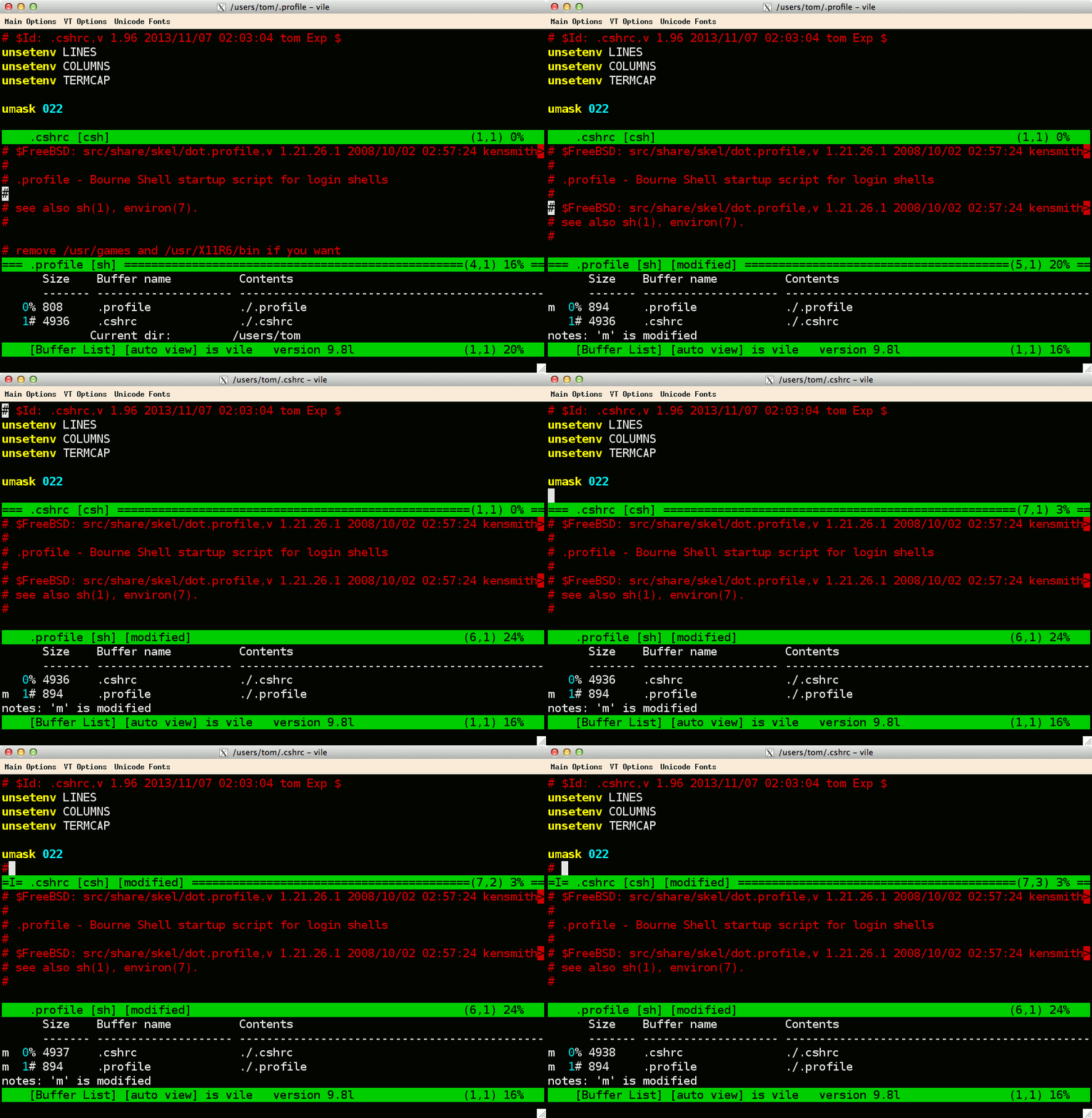
The dynamic displays in vile were something
that occurred to me when I first became involved with
vile at the end of 1992, looking at the
[Buffer List] display, and wondering why the
“%” and “#” markers
did not automatically move around in the display as I switched
the current buffer. I fixed that. That led to improving the way
vile does caching of buffer size and line-numbers. Once
that buffer was dynamic, doing the same for other buffers seemed
intuitive. None of that is reflected in the development of the
other vi clones.
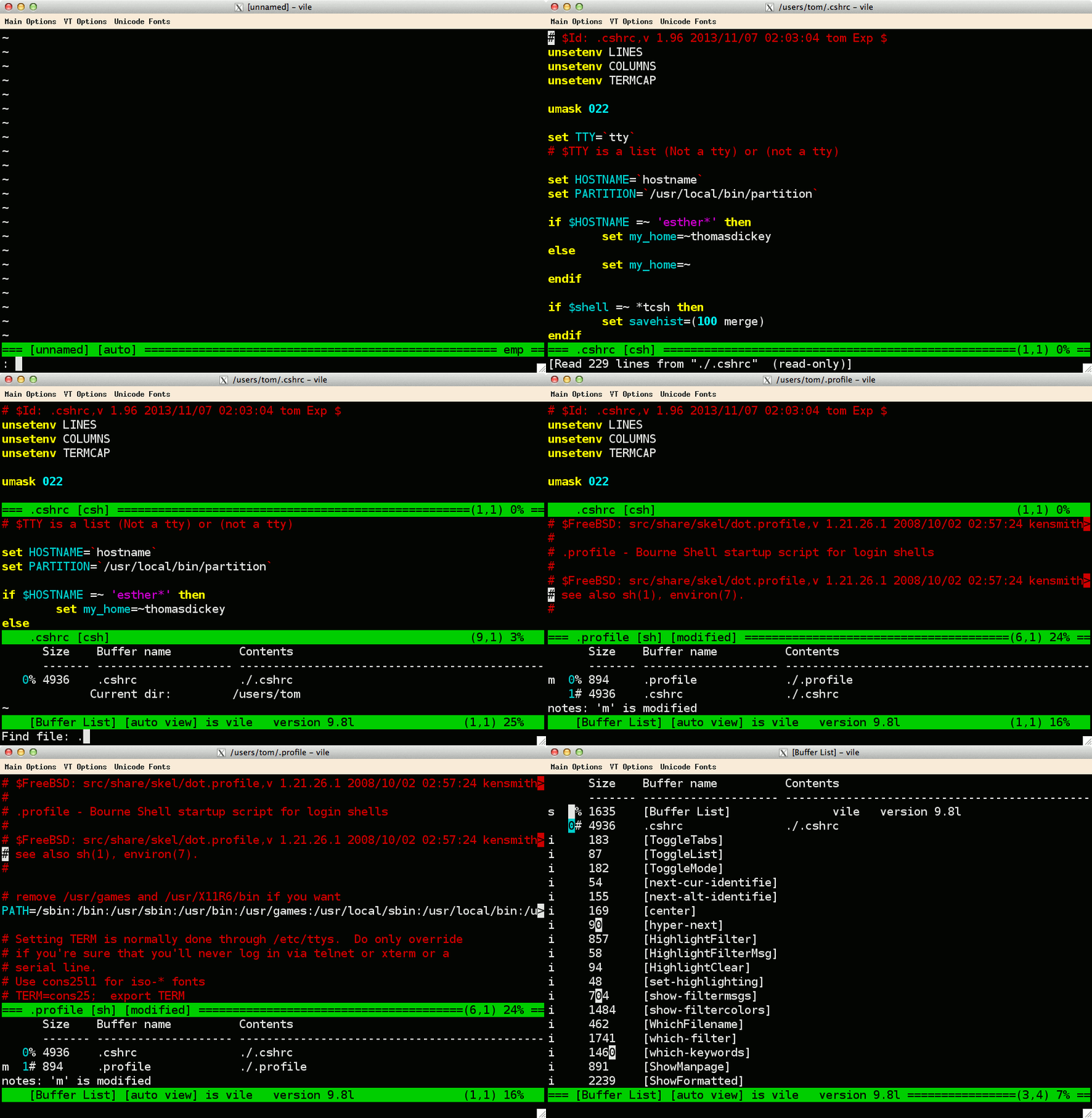
Here are a couple of animated GIFs to illustrate dynamic displays:
Vile should build properly on any Unix platform (or similar such as Linux, Cygwin, QNX and BeOS), using the auto-configure script to check for required system features. The configure script is normally Unix-specific (because it uses a variety of shell commands such as sed), but can be regenerated for some other environments such as OS/2 EMX.
Specialized build scripts and I/O drivers are also provided for non-Unix platforms:
I have built—and used—vile on all of those.
This is rather lengthy, and is discussed here.
Vile evolved from K&R source, to extended C, i.e., K&R code with ANSI prototypes (which is what many programs are written in). Early in 1996 we chose to convert vile to ANSI C to take advantage of the better type-checking available. So vile requires an ANSI C compiler.
Vile will build with a C++ compiler, though you may have difficulty with the configure script.
On Unix and Win32, vile can be built for character-cell and GUI terminal types. Most of the terminal-specific I/O calls are made through a generic interface, however you cannot reuse the object files from one type on configuration to build the other.
Some of the Unix configuration tests may yield different results, or be incomplete for one configuration versus another. We remove the config.cache file explicitly in the configure script to circumvent problems with this.
Vile is similar to vi in some ways, but it reads its own startup file to avoid surprise should you happen to execute vi. Vile's initialization scripts include many commands which would confuse vi.
On Unix, vile looks for .vilerc,
starting in the current directory, then in the home directory,
and finally in the installed share-directory (shown in the
variable $startup-path).
On other systems (including those that cannot use multiple
dots in filenames such as VMS, or do so in a crippled fashion
such as Win32), vile looks for
vile.rc.
In either case, you can use the command
which-source to show which file is actually loaded.
Use a count before the command to show all files which would be
checked, and the corresponding matches, e.g.,
2
:which-source .vilerc
The most critical ones are documented in the online help
vile.hlp, which you can view by
:h
They include those specific to vile
VILEINIT
VILE_HELP_FILE
VILE_LIBDIR_PATH
VILE_STARTUP_FILE
VILE_STARTUP_PATH
XVILE_MENU (doc/menus.doc)
as well as variables borrowed from common Unix or Win32 convention:
$shell variable for
specifying subshells, including those used for syntax
filtering.$LOGNAME to identify you for
reporting errors, or for locking files.There are several ways. Some are created by the installer:
Besides that, there are some programs which have their own
mechanisms, which may/may not work well without some
customization. On Windows, the key to doing this is to use the
start keyword. For instance, I used this (as
"grep-winvile.bat") with Windows Grep 2.3, which let me jump to
the given line and column of a match (trivial with Visual
Studio):
@echo off
rem %1 = filename
rem %2 = line
rem %3 = column
setlocal
cd "C:\Program Files (x86)\VI Like Emacs\bin"
set EDITOR=winvile-wide-ole.exe
set PARAMS=-h
if "x%1"=="x" goto edit
set PARAMS=%1
if "x%2"=="x" goto edit
set PARAMS=+%2 %1
if "x%3"=="x" goto edit
if "x%3"=="x1" goto edit
if "x%3"=="x2" goto edit
set /a PARAM2=%3 - 2
set PARAMS=+%2 -c "%PARAM2%:right-arrow" %1
goto edit
:edit
start %EDITOR% %PARAMS%
endlocal
A simpler wrapper script suffices for Eclipse (sorry, no line/columns without a plug-in):
@echo off
setlocal
set WINVILE_DIR="C:\Program Files (x86)\VI Like Emacs\bin"
cd %WINVILE_DIR%
IF ERRORLEVEL 1 goto :finish
set WINVILE_EXE=WinVile-wide-ole.exe
if exist %WINVILE_EXE% start %WINVILE_EXE% %1 %2 %3 %4 %5 %6 %7 %8 %9
:finish
endlocal
Vile makes use of color to make your file easier to read. It has modes to set the foreground, background and status line colors (fcolor, bcolor and mcolor respectively). Add this to your initialization file to get the predefined color schemes:
source palettes.rc
The most useful schemes are white,
black and default, which you can
specify by setting the cs mode, e.g.,
:set cs=white
It can also overlay colors and other visual highlighting on your file to show the syntax. The overlay is computed by an external program, referred to as a syntax filter.
The simplest way to turn on syntax highlighting is to add
source filters.rc
to your initialization file, e.g., .vilerc.
Rather than sourcing each file separately, this does it all:
source vileinit.rc
Typing ^X-q will paint colors according to the majormode which applies to the given file. Typing ^X-Q will clear all of the colors.
If you have a reasonably fast computer, adding
setv $read-hook HighlightFilter
will tell vile to paint colors each time it reads a file.
Well, you did all that, and there are no colors. If there is a majormode in effect for the buffer, vile attempts to run a syntax filter based on the name of the majormode. Check to see if vile is configured to display colors:
:show-colors
If that works, then the problem is with the syntax filter (perhaps vile cannot find it for some reason). If it does not work, then you have to set up colors (assuming your terminal can display color).
For character cell terminals on Unix, i.e., termcap or
terminfo, vile reads the color information
specified by your $TERM variable. See the ncurses FAQ for more information.
The X Window configuration, xvile reads the color
assignments from resources, and is documented in the online help.
The Win32 and other non-Unix ports do not require external files
to set up color.
If colors are working, perhaps vile simply did not find the syntax filter.
Vile colors a buffer by overlaying regions of the text with color attributes. Because there can be many, many regions, space is important. The color for each region is stored in four bits.
In English, vile can display 16 colors.
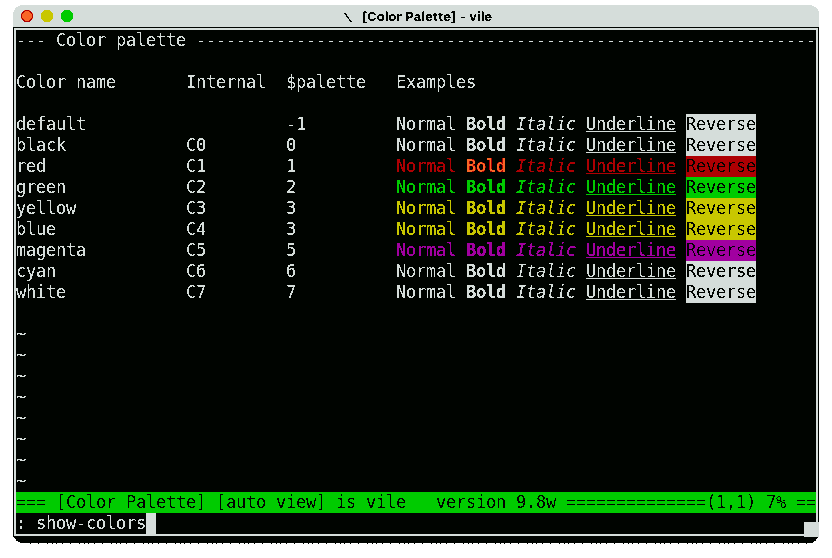
You can see which colors are available using the :show-colors command:
If you look closely, the rows for yellow and blue are the same color. That is because the color-scheme in effect tells vile to map the color codes for yellow (C3) and blue (C4) to $palette code 3. Blue text is not easy to read on a black background. The color scheme (named “white”) maps blue to yellow.
Syntax filters may be built-in (statically linked, or
dynamically loadable), or run as separate programs. The former
are more portable, less trouble to run and somewhat faster. The
configure script (and the win32 makefile) provide a means to
specify that any combination of filters can be built-in or
external. Even if they are built-in, vile can still run external
filters—that choice is left to the macro which performs the
highlighting, e.g., HighlightFilter.
You can see which filters are built-in by looking at the result of
:show-variables
for the $filter-list variable:
Vile looks for external syntax
filters in your path—after adding the library directory
$libdir-path to the end.
Use
2:
which-exec
to display the places where vile looks—an "*" will mark the ones it finds.
We changed the form and use of $HOME/.vile.keywords with version 8.3:
The old scheme had no provision for multiple syntax filters. The new scheme names keyword files according to the syntax filter which is used, and may load two files, e.g., $HOME/.c.keywords and $HOME/.vile.keywords for cmode (i.e., C).
To see which files are found, run the corresponding filter with the -v option. For example, vile-html-filt -vv on this file produces output beginning
ReadKeywords(vile)
..skip ./.vile.keywords
Opened /home/tom/.vile.keywords
parsed  name "" attr "<null>"
parsed  name "" attr "<null>"
parsed  name "Action"   attr "BC1" - class
parsed  name "Comment"  attr "C1" - class
parsed  name "Error"    attr "RC1"
parsed  name "" attr "<null>"
parsed  name "Ident2"   attr "C6" - class
parsed  name "Keyword"  attr "BC3" - class
parsed  name "Keyword2" attr "BC1" - class
parsed  name "Literal"  attr "C5" - class
parsed  name "Number"   attr "BC6" - class
parsed  name "Preproc"  attr "C2" - class
parsed  name "Type"     attr "BC2" - class
ReadKeywords(html)
..skip ./.html.keywords
..skip /home/tom/.html.keywords
..skip /home/tom/.vile/html.keywords
Opened /usr/local/share/vile/html.keywords
The trace notes "..skip" for files that are not found. On Unix, files in the current or home directory are prefixed with "." to hide them. The ".vile.keywords" file is read first, to provide default values for classes.
You can also use the which-keywords macro. For
example,
:which-keywords vile
makes a window showing:
Show which keyword-files are tested for:
        vilemode
(* marks found-files)

$cwd
  ./.vile.keywords
$HOME
* ~/.vile.keywords
  ~/.vile/vile.keywords
$startup-path
* /usr/local/share/vile/vile.keywords
The syntax filters read their keywords from external files, which list the keywords along with their class. Classes can be defined in keyword-files, but we prefer to define the commonly-used classes (such as the color of comments) in a single user-customizable file. That is the vile keyword file.
For example, this output from which-keywords vile shows that two matches are found. Vile uses the first one, in the home directory:
Show which keyword-files are tested for:
vilemode
(* marks found-files)
$cwd
./.vile.keywords
$HOME
* ~/.vile.keywords
~/.vile/vile.keywords
$startup-path
* /usr/share/vile/vile.keywords
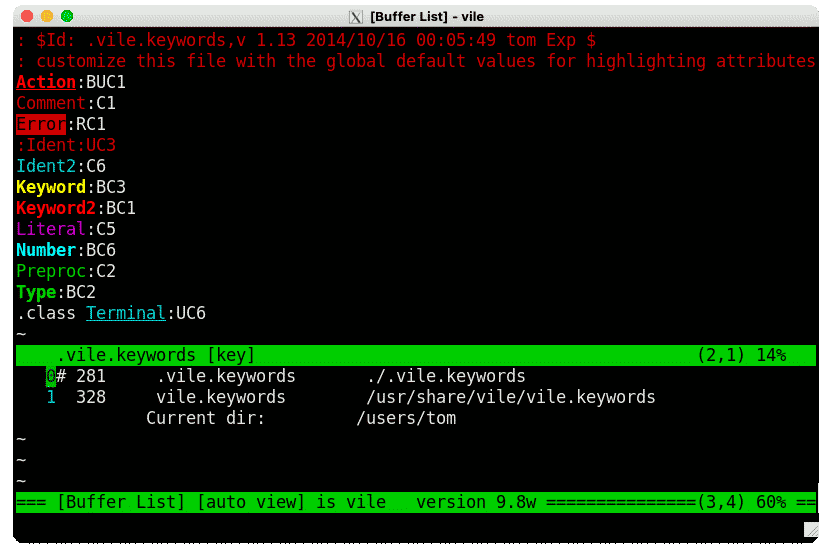
Here is an example:
Each of the (non-comment) lines in the file defines a class. The characters after the “:” (colon) give
The last line in the example uses the directive .class, which is sometimes necessary to resolve ambiguity with regard to keywords versus classes.
Because vile's keyword syntax highlighter automatically colors the class names with their defined color, it is easy to see the effect of changing a color definition.
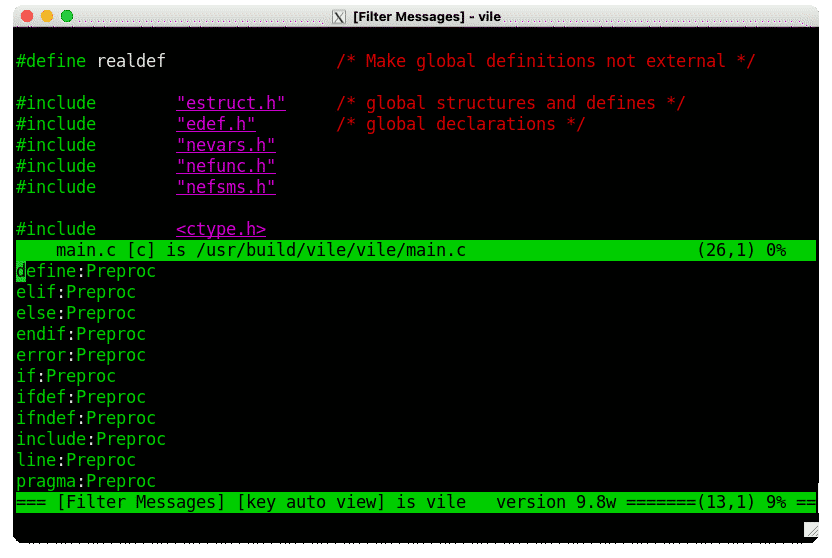
The keyword files use the color classes. You can inspect those files with vile. Alternatively, you can use the show-filtercolors in a buffer to show the keywords for the current majormode.
Here is an example:
The syntax filters distributed with vile do not color every
word, but the colors should be consistent, corresponding to the
syntax. (Coloring every word detracts from readability; by design
most of the text is left with the global foreground color
fcolor).
But the coloring may be incomplete or inconsistent, and it may not be due to a coding error in the syntax filter. This may happen when the colors overlaid on your buffer from the syntax filter are not aligned properly. Vile runs the given filter, reads the resulting output and extracts markup from it to paint on your file. If another program produces output, it will confuse vile, since the output is not necessarily aligned with your file.
For example, if your $shell is
/bin/csh, and your .cshrc file contains an
stty command, that program will write an error message
when it is run in a pipe. I work around this by setting
$shell to /bin/sh (my .profile
is empty), which bypasses messages and is faster:
setv $shell=/bin/sh
A better solution bypasses the shell entirely. Build vile
using the --with-builtin-filters option. That
compiles-in the syntax filters, which also runs much faster. The
only drawback to that approach is the size of the executable.
Your system may also support
--with-loadable-filters, which allows you to keep a
relatively small vile executable, with some speed advantage over
the original external filters.
Well, take this in stages:
fcolor and bcolor has an effect? If
not, then you have to setup color for vile.cmode for "c"
majormode. The corresponding filter is named
vile-c-filt, and must be installed in a place where
vile can find it.^X!vile-c-filt -vv %
to run the "c" filter into [Output] on the
current buffer, in verbose mode. (That's a control/X). The
output should show the markup definitions loaded, as well as
the marked up file (places with ^A).
$shell is resetting $PATH. I work around this
by setting $shell to /bin/sh (my
.profile is empty), which is faster.We recommend building the syntax filters with flex
(e.g., version 2.5.4a). You can build workable filters
with recent versions of lex, but older ones usually lack the
%state support needed for most of the filters.
Some older implementations of lex also assume a different order for the chunks of C code in the lex specification; however these do not appear to work well even when the chunks are moved to make the filter compile.
Chunk-ordering is not solely a problem with antique versions of flex. There is a so-called "new" flex available which introduces similar bugs. While the code can (has been as of 9.4) reordered, the maintainers of this new version do not respond to bug reports (it appears to be a defunct project). Stick with flex 2.5.4a, which works.
Writing in 2011, there were two areas where "new" flex was known to be broken:
-P option, which vile uses to construct
built-in syntax filters was broken in every version of "new"
flex, though the exact cause varied from one version to the
next.Reviewing this in 2020, the situation with "new" flex has improved slightly:
Besides the unnecessary compiler warnings, other problems may
arise. As an alternative to "old" flex, you may wish to install
reflex and
(setting the $LEX environment variable to "reflex")
build vile using that.
XVile (vile configured with the X11 driver) uses bitmap fonts, as described in X(7). The section Font Names summarizes the syntax for the resource settings which tell xvile which font to use. However, a default configuration for an end-user system may not have the fonts installed and ready for use.
Once a machine is set up properly, the fonts require no maintenance. But setting up a new machine is unnecessarily complicated. As an aid to finding the fonts referenced in the resource files, it helps to know which packages were used in similar machines.
The script find-xterm-fonts can be used to show where the font files are installed, and which package provided those files. Here are sample outputs for a few systems:
Package information is not available for all systems. On some, e.g., the BSDs and Solaris, the fonts are installed as part of the base system (outside the packaging system).
Like most of the older X applications, xvile uses the
X Toolkit
Intrinsics for locating fonts and other resources (see
the section “Finding
File Names” in the specification). In at least one
case (seen with NetBSD 9 in 2020), the base system provides
incomplete support for packages which use X because the
compiled-in default search path for resource files does not
include the packaging system. This is a known problem, e.g.,
reported in
2016 for xfig. A suggested workaround at the time
proposed modifying the /etc/fstab file, adding this
line:
/usr/pkg/lib/X11/app-defaults /usr/X11R7/lib/X11/app-defaults union rw,hidden
(the suggestion overlooks creating the mountpoint
/usr/pkg/lib/X11/app-defaults).
WinVile requires fixed-pitch fonts. Windows provides a few. If you have Microsoft Office installed, Windows provides a lot.
Vile accepts most—not all—commands that vi implements. The few that are not implemented are generally because their syntax is not compatible with vile's command-parsing or name-completion. (For the ones that are compatible—someday).
Vile's extensions over vi are documented in the help file. Detailed descriptions for writing macros, etc., are in the doc directory which is part of the source distribution. But the essential information is in the help file. Just type
:h
The help file is static, and requires you to search it. Far nicer are the features for listing commands, e.g.,
:describe-bindings
That looks like a lot to type. But it is not. With name-completion, one may press tab to fill in the unambiguous parts and see what choices there are.
:des<tab>
:describe-<tab>
:describe-b<tab>indings
:describe-bindings
Submit bug reports via the project mailing list, or via the web-based bug reporting system. Both of these are available here:
Subscribing to the mailing list is also the best way to keep informed of new releases.
Not formally. This FAQ provides a start; if it becomes long it will be in a separate page.
Paul Fox started vile in 1990. According to his comment in main.c:
 * this used to be MicroEMACS, a public domain program written by
 * dave g. conroy, further improved and modified by daniel m. lawrence.
I have been the project maintainer following Paul's changes on
September 10, 1996 (vile 6.2).
The switch in maintainers was due to my work to ANSIfy vile, and move away from
“legacy C” (unlike other vi-clones, even in
2014):<>
I began by ensuring that prototypes were used everywhere,
and then focused on using (where possible)
const.
One of the latter changes broke the imdying function (which saves a copy of the current buffer when vile is unexpectedly killed).
Paul Fox decided that it would be better if I were the maintainer, so that I could deal with these issues firsthand.
As part of the switch, Paul Fox gave me a copy of his RCS archive for vile. I had already begun my own RCS archive (with more detailed history for my own changes), so there was no convenient method for merging the two. I refer to both in providing dates and analysis.
Most of the project highlights are recorded in the CHANGES* files which are part of
the project.
Initially, Paul Fox made about one release per year, renaming
CHANGES to CHANGES.R3 as part of releasing
vile 4.0, etc.
We kept that scheme up until 1999.
Beginning with vile 9.0, the granularity of the versions is finer. I use an alphabetic suffix (occasionally going past z). After all (unless I change the goal), reaching “10” will make it perfect. There is no point in hurrying, as Zeno was well aware.
That said, here is an outline of the project highlights which I wrote based on reading the change-logs and RCS archives:
Vile is covered reasonably well in both of these. I have found the 6th edition of the O'Reilly book more useful. The 6th edition is useful due to Robbins' inclusion of vi esoteria. That is not provided in earlier editions.
On the other hand, I contributed much more (to the section on vile, of course) to the 7th edition (see original, and discussion).
Learning the vi Editor, 6th Edition by Arnold
Robbins, Linda Lamb
O'Reilly & Associates, November 1998.
Chapter 12 (pages 229-258) presents vile 8.0.
Learning the vi and Vim Editors, 7th Edition
by Arnold Robbins, Elbert Hannah, Linda Lamb
O'Reilly Media, July 2008.
Chapter 18 (pages 343-374) presents vile 9.6.
Earlier, I relied for vi information on this:
It is out of print.
Certainly.
Vile does not store or retrieve dates in any form that depends on the year. Vile's use of time information is limited to
Vile is copyrighted by Paul G. Fox, Thomas E. Dickey and Kevin Buettner with some files (e.g., visvile) copyright by Clark Morgan. We distribute it under the terms of the GNU Public License, Version 2.
![vile – [Variables] showing $filter-list](/vile/images/variables-filter-list.png)